
To enter the National Economics Challenge (NEC) from China, you register through CNEC — the official China National Round operated by Hanlin (SKT) since 2016, and the only official path from China to the NEC global rounds. In practice that means creating a CNEC entry, choosing your division, forming your team, and confirming everyone's details before the cycle closes. This walkthrough covers only that sign-up mechanics — not preparation or exam content.
Before you start: what registration is (and is not)
Registering for CNEC is an administrative step, separate from preparing for the contest. It is the act of getting your name, your school, and your teammates onto the official China National Round roster for the current cycle. The NEC itself is run by the Council for Economic Education (CEE), founded in 1949, which sets the academic standard; CNEC is the authorized China-side round through which students in China actually enter. Hanlin operates CNEC across 20+ provinces and 300+ schools.
One decision shapes everything else on the form: which division you enter. NEC is organised by level, and the division you choose determines whether you sign up as an individual or as part of a four-person team. Per the organiser, the three divisions are:
| Division | Level | How you enter (per the organiser) |
|---|---|---|
| Pre | Entry | Individual, or a team of 2–4 |
| David Ricardo | Intermediate | Team of 4 |
| Adam Smith | Advanced | Team of 4 |
Pick your division before you open the registration form, because it changes how many people you need to line up. The Pre division gives flexibility — you can register solo or build a small team. The David Ricardo and Adam Smith divisions are team events, so you will need to confirm four participants who can all commit to the cycle.
Step 1 — Reach the official CNEC entry point
Start from the official channel, not a third-party link. The CNEC homepage at en.nec.org.cn is the reference point for the China National Round — the current cycle's registration window, divisions and instructions are published there. Beginning from the official source matters: registration windows open and close on a schedule, and entering through the wrong route can mean your details never reach the official roster.
A practical habit before you go further: confirm you are looking at the current cycle. NEC and CNEC run annually, and dates, divisions and any fees are set per cycle by the organiser. If the page you are reading is from a previous year, the registration link may be closed. When in doubt, return to the CNEC homepage and confirm on the official CNEC channels which cycle is currently open.
Step 2 — Create your account and entry
Registration begins with an account or entry record that identifies the student. At this stage you are establishing who is competing — the participant's name (as it should appear officially), school, grade level, and a working contact channel. Treat accuracy here as non-negotiable: the name and school you enter are what carry through to results, certificates and, ultimately, any onward path to the global rounds.
A few things worth getting right the first time:
- Use the student's legal/official name consistently — matching how it appears on school records — so certificates and any verification are clean.
- Name your school accurately and in full. CNEC spans 300+ schools; an exact school name avoids confusion later.
- Give a contact channel that is monitored. Registration confirmations, scheduling notices and instructions are sent through it — a missed message can mean a missed step.
- Record your login details somewhere safe. You may need to return to the entry to add teammates or confirm information.
The exact fields, account system and any verification step are defined by the organiser and can differ by cycle, so follow the on-screen instructions on the official CNEC platform rather than assuming the layout from a previous year.
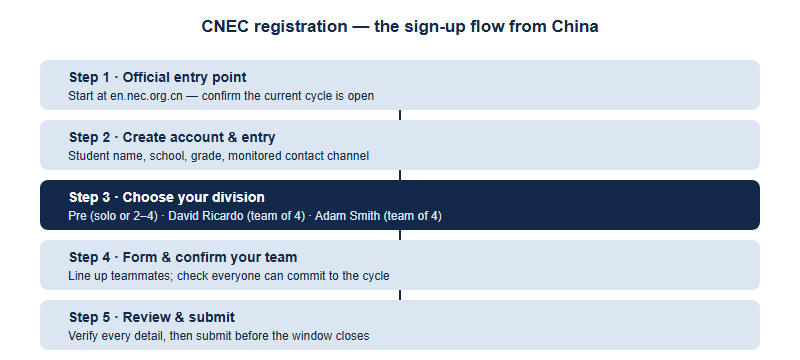
Step 3 — Choose your division on the form
With the entry open, select the division you decided on earlier. This is the single most consequential choice in the process, because it sets the level you compete at and the team size you must supply. If you are new to NEC and want flexibility, the Pre division lets you register individually or with a small group. If you and your peers are ready for a full team event at intermediate or advanced level, David Ricardo or Adam Smith each require a team of four.
If you are unsure which level fits, that is a preparation question rather than a registration one — but for the form itself, the practical rule is simple: only commit to a team division if you genuinely have four committed participants. Confirm the division definitions for the current cycle on the official CNEC channels, since the organiser may adjust how divisions are framed year to year.
Step 4 — Form and enter your team
For the team divisions, the registration is only complete once every team member is accounted for. The exact mechanism — whether one student registers the team and adds members, or each member registers and links to a team — is defined by the CNEC platform for the cycle, so read the on-screen instructions carefully. Whatever the mechanism, the logistics you control are the same:
- Agree your line-up early. A team of four is easier to confirm when everyone has said yes before you open the form, not during it.
- Collect each member's details in advance. Have official names, schools and grade levels ready so you can enter them in one sitting without chasing people.
- Designate a point person. One student or supervising teacher coordinating the entry reduces the chance of duplicate or mismatched records.
- Confirm school eligibility together. If teammates come from different schools, check the current CNEC rules on team composition rather than assuming it is allowed.
Team-composition rules — whether members must share a school, and how substitutions are handled — are set by the organiser and can vary by cycle. Confirm these on the official CNEC channels before you finalise your roster.
Step 5 — What to prepare, review and submit
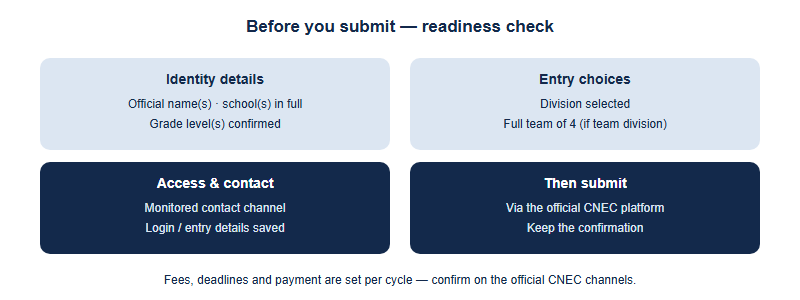
Before you hit submit, do a deliberate review pass. Registration errors are far easier to prevent than to correct once a window closes. The checklist below covers the administrative essentials; it deliberately says nothing about study, which is a separate task.
| Item to prepare / check | Why it matters at sign-up |
|---|---|
| Student official name(s) | Carries through to results and certificates — must match school records |
| School name(s), in full | Identifies you correctly among 300+ CNEC schools |
| Grade level(s) | Used to confirm eligibility and placement |
| Chosen division | Sets your level and required team size |
| Full team line-up (if team division) | Team divisions are incomplete without all four members |
| Monitored contact channel | Receives confirmations, scheduling and instructions |
| Login / entry details saved | Lets you return to amend or confirm before the deadline |
When every row checks out, submit through the official platform and keep any confirmation you receive. After submitting, watch your contact channel for the official acknowledgement and any follow-up steps — some cycles require a confirmation or further action after the initial entry. Anything to do with fees, exact deadlines and payment is set by the organiser per cycle, so confirm the current figures and timing on the official CNEC channels rather than relying on any number quoted elsewhere.
A first-party note from the CNEC desk
As the officially authorized China test center for the NEC, the CNEC desk processes these entries every cycle, and the avoidable problems are almost always the same: a name that does not match school records, a "team" that turns out to be three people, or a contact channel nobody is watching. None of these are about economics — they are about getting the paperwork right the first time. Our practical advice is to settle your division and full line-up before opening the form, gather everyone's official details into one place, and treat the review pass as seriously as the contest itself. For the current cycle's window, divisions and instructions, work from the official CNEC homepage; the CEE sets the underlying academic standard for the NEC, while the live registration details — dates, fees and any confirmation steps — are published and updated on the official CNEC channels. This article covers the sign-up mechanics only, not preparation or exam content.
Frequently asked questions
How do students in China register for the NEC?
Through CNEC, the official China National Round operated by Hanlin since 2016 — the only official path from China to the NEC global rounds. Start at en.nec.org.cn.
Do I register individually or as a team?
It depends on division: Pre allows individual or a team of 2–4; David Ricardo and Adam Smith each require a team of four. Confirm current rules officially.
What information do I need to sign up?
Each participant's official name, school, grade level, the chosen division, and a monitored contact channel. Exact fields are set by CNEC per cycle.
Where do I find the deadline and any fees?
Registration windows, deadlines and fees are set per cycle by the organiser — confirm the current figures and timing on the official CNEC channels.
Published by the NEC / CNEC editorial desk, operated by Hanlin Education as the officially authorized China National Economics Challenge (CNEC) test center. The NEC is run by the Council for Economic Education, which sets the official rules — always confirm current dates, divisions, fees and awards on the official CNEC channels. Any errors will be corrected within 7 working days.